On the surface, it looks like a great return. Far more impressions than forecasted, 280 clicks and a 2% click-through rate. Then I looked closer.
280 clicks, zero visits
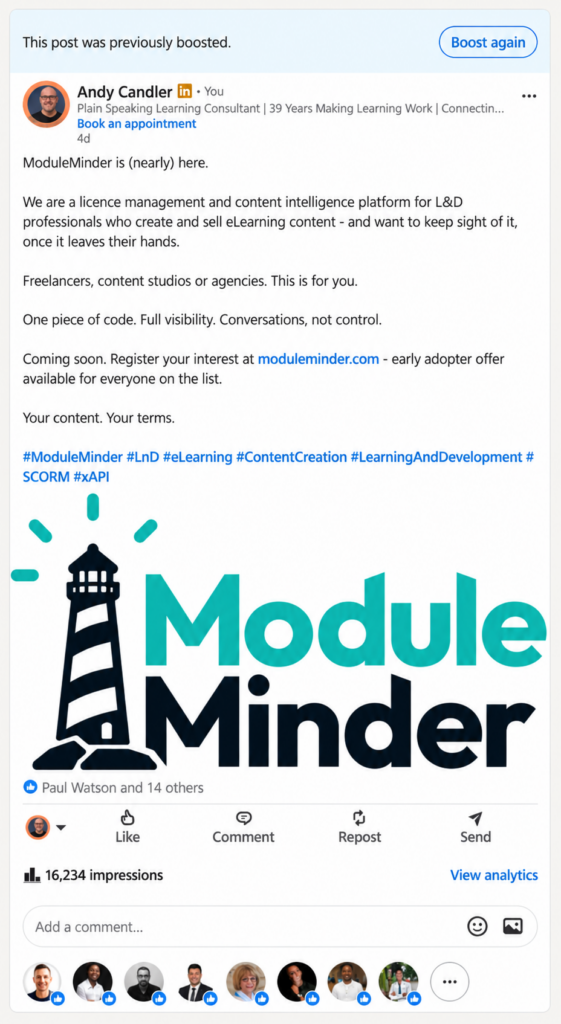
This was the eye-opener. On LinkedIn, a “click” includes clicks on your content, your name or your image. It doesn’t mean someone went to your website. My post was long enough to be cut off with “see more”, and it had a large logo image. So, most of those 280 clicks were people expanding the text or enlarging the logo. Not one of them clicked through to www.moduleminder.com.
It appeared in front of new people
Just 1% of the impressions came from my followers and connections. That’s around 160 views from the 5,486 people who know me already. The rest went to new people, and this is exactly what I wanted. It would seem crazy to pay £50 and appear in front of my current audience.
Unpaid viewers were more engaged
Around 4,000 organic impressions produced 9 reactions. Around 12,000 paid impressions produced 6. The people LinkedIn found for free, were roughly four times more likely to react than the people I paid to reach. I don’t actually know what to make of this statistic. My first reaction is maybe I boosted the wrong post – one that was not engaging enough.
Where the views came from
The biggest audiences were in; Istanbul, Barcelona, Madrid, Paris, Cairo, Lagos, Johannesburg and Ankara. London came in at 1%, and no US city made the list at all.
At first, I couldn’t work out why Cairo and Lagos were there. I actually joked a few days into it that suddenly I had hit a rich seam of people in Nigeria – engaging with me – and I didn’t know why.
Then I remembered that my targeted choice. I’d ticked EMEA, which stands for Europe, the Middle East and Africa. I’d effectively asked LinkedIn to show my post across three continents, expecting it to do it equally, but this is not what happened.
Why it happened
LinkedIn gave me exactly what I asked for. I chose “More impressions”, so it went looking for the cheapest impressions it could find within my target. By selecting EMEA I’d given it a huge, varied region to work with, and impressions in some of those markets cost far less than in London or New York. My goal was sign-ups, but Boost didn’t ask me for that specificity.
Then I realized that the forecasted numbers gave it away.
LinkedIn’s estimate implied a cost of around £15 per 1,000 impressions. I actually paid £4.11, and got more than three and a half times the impressions it predicted. That sounds like a bargain until you ask where those cheap impressions came from.
And critically looking at the post again. It led with the product name rather than the problem it solves, and it didn’t invite a conversation. Boosting obviously amplifies whatever you give it, and I gave it a piece of news, not a reason to engage or click.
What I’d do differently
Pick the goal that matches the outcome. If you want website visits, set that up properly in Campaign Manager rather than using the quick Boost button.
Check what your location labels actually cover. I ticked Europe, the UK, the EU and EMEA, not realising EMEA includes the Middle East and Africa and swallows the other three. Pick the specific countries you can serve.
Measure what matters. For me that’s sign-ups on the ModuleMinder list, not impressions.
And most importantly, think about Boosting a post that’s already doing well organically. Don’t boost one that’s not doing a lot, in the hope that throwing money at it will make it more important.
Was it worth £50?
As a marketing exercise, not really: Each paid reaction cost me £8.33, each new follower around £7, and the website visits I was hoping for just didn’t happen.
As a marketing lesson, absolutely: I now understand what LinkedIn’s numbers mean, and I’ll spend the next £50 far more wisely – if at all.